
Web & Browser
How the Immersive Experience Engine Works
CipherRoot Software8 min read
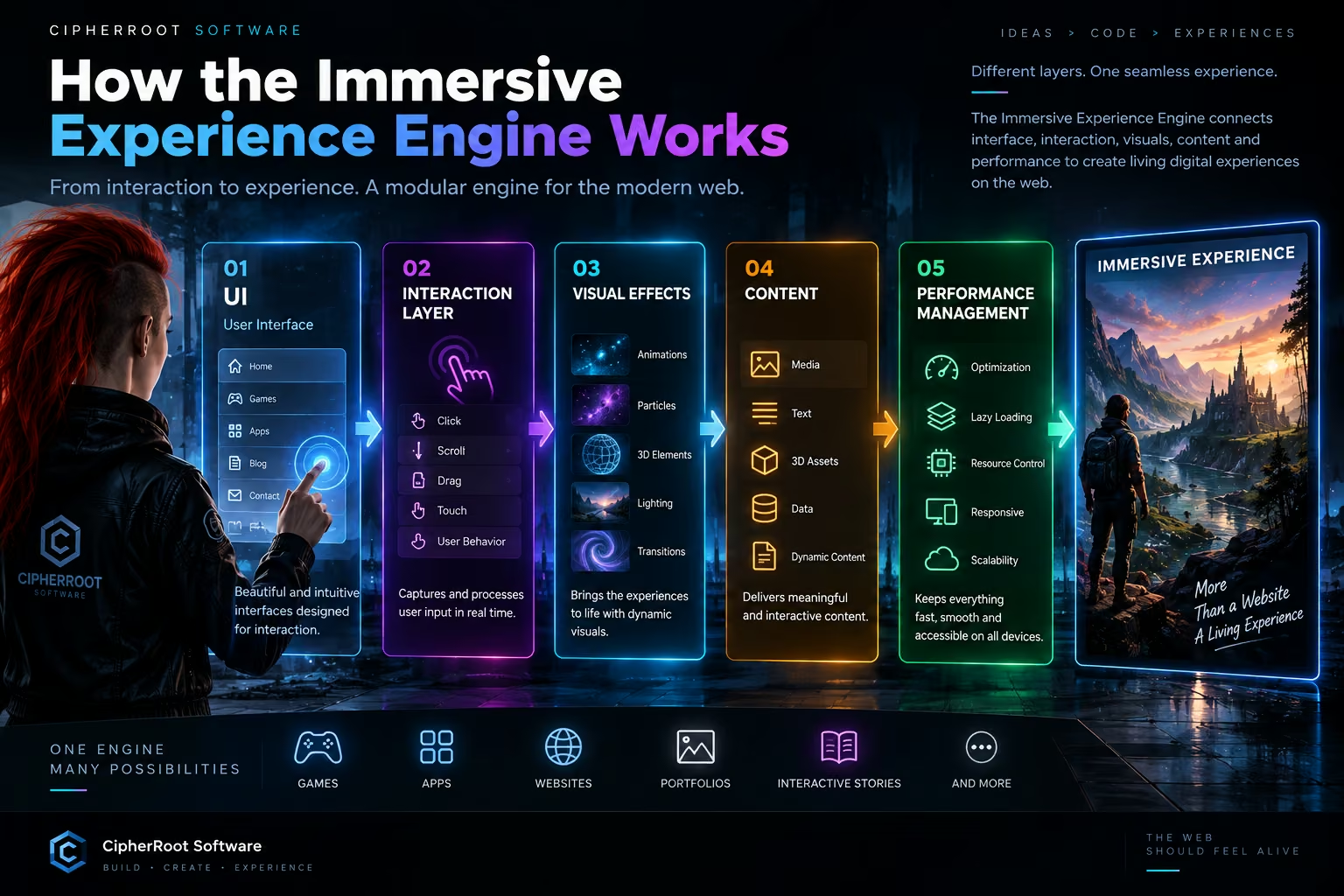
An immersive website may look simple from the outside, but the experience behind it can involve several systems working together.
The Immersive Experience Engine is built around a modular architecture in which the interface, user interaction, visual effects, content, and performance layer communicate with one another.
A simplified version looks like this:
UI ↓ Interaction Layer ↓ Visual Effects ↓ Content ↓ Performance Management ↓ Immersive Experience
Each layer has a specific responsibility. Together, they transform ordinary web components into a responsive digital experience.
1. UI — The Interface Layer
Everything starts with the User Interface.
The UI is the part the visitor sees and directly interacts with: navigation, buttons, cards, menus, typography, images, controls, and content sections.
A strong immersive experience still needs a clear foundation.
The interface should answer basic questions immediately:
Where am I?
What can I do?
Where can I go next?
The Immersive Experience Engine does not replace traditional UI design. Instead, it provides a foundation that allows the interface to become more dynamic.
A button can transition smoothly into another state.
A card can reveal additional information.
A navigation element can transform as the user moves through the experience.
The UI remains understandable while becoming more responsive.
2. Interaction Layer — Understanding the User
The next layer is the Interaction Layer.
This system observes what the visitor is doing and communicates those actions to the rest of the experience.
Interactions can include:
Clicks Taps Scrolling Hovering Dragging Pointer movement Keyboard input Touch gestures
For example, imagine a visitor scrolling through a technology presentation.
The interaction layer detects the scroll position.
That information can then trigger a sequence:
User Scrolls ↓ Interaction Layer ↓ Experience State Changes ↓ Animation Begins ↓ Visual Layer Updates
The interaction layer therefore acts as a bridge between the visitor and the experience logic.
Without it, visual effects would simply play independently.
With it, visual behavior can respond to what the user actually does.
3. Visual Effects — Making the Experience Dynamic
Once the system understands user interaction, the Visual Effects Layer can respond.
This is where animation, transitions, lighting, particles, depth, motion, and other visual systems become part of the experience.
Visual effects can serve different purposes.
Motion
Elements can move naturally between states rather than appearing or disappearing instantly.
Depth
Layered backgrounds, foreground elements, and lighting can create a stronger sense of spatial composition.
Transitions
Smooth transitions can help users understand that the interface has changed.
Particles
Particles can add atmosphere to a scene or emphasize interaction.
3D Elements
Depending on the project, 3D models and environments can provide another level of exploration.
The important principle is that visual effects should react to the experience rather than exist independently from it.
A visitor clicks a feature.
The system responds.
The visual layer changes.
The user immediately understands that their action had an effect.
4. Content — The Information Layer
Visual effects alone do not create a useful experience.
The fourth layer is Content.
Content includes everything the experience is actually communicating:
Text, images, videos, products, articles, game information, statistics, 3D assets, interactive demonstrations, and other media.
The Immersive Experience Engine treats content as something that can participate in the experience rather than simply being placed into static containers.
For example, instead of showing a list of product features:
Feature 1 Feature 2 Feature 3 Feature 4
an interactive presentation could reveal each feature as the user explores the interface.
The information remains the same.
The way the information is experienced changes.
This separation between content and presentation also makes the system easier to maintain.
Content can evolve without rebuilding the entire interaction system.
5. Performance Management — Keeping Everything Fast
The final layer is Performance Management.
This layer is essential because immersive experiences can require significantly more resources than a simple static page.
Large images, animations, 3D assets, audio, particles, and interactive rendering all consume resources.
Performance management helps ensure that these systems do not compromise usability.
A performance layer can be responsible for:
Asset Optimization
Delivering appropriately sized images, videos, and other resources.
Lazy Loading
Loading heavy assets only when they are needed.
Resource Management
Avoiding unnecessary processing when elements are outside the active experience.
Responsive Optimization
Adapting visual complexity to different screen sizes and devices.
Rendering Efficiency
Reducing unnecessary animation and rendering work.
Progressive Experience
Allowing essential content to appear before optional visual systems finish loading.
The goal is simple:
The experience should remain immersive without becoming slow.
How the Layers Communicate
The real power of the system comes from connecting the layers.
Imagine a visitor opening an interactive product presentation.
Step 1 — UI
The visitor sees a product card and a button.
Step 2 — Interaction
The visitor clicks the button.
Step 3 — Experience Logic
The system changes the active experience state.
Step 4 — Visual Effects
The product expands, the background changes, and supporting information animates into view.
Step 5 — Content
The relevant product information becomes visible.
Step 6 — Performance Management
Only the resources required for the new state are loaded and processed.
The visitor experiences one continuous interaction.
Behind the scenes, several systems are communicating.
A Modular Architecture
One of the key principles of the Immersive Experience Engine is modularity.
Different projects have different needs.
A portfolio might require:
UI Interaction Animation Content
A 3D product experience might require:
UI Interaction 3D Rendering Visual Effects Content Performance Management
A browser-based game could require an even more specialized architecture.
The engine does not need every component in every project.
Instead, the architecture can be assembled around the experience being created.
This makes the system flexible and easier to evolve.
Experience States
Another important concept is the idea of experience states.
An immersive page can have multiple states rather than behaving like one static document.
For example:
State 1 Landing ↓ State 2 Exploration ↓ State 3 Interaction ↓ State 4 Detailed Content
User actions can move the experience between these states.
A click, scroll, gesture, or other interaction can trigger a transition.
This approach makes complex experiences easier to organize because the system always knows what state it is currently displaying and what should happen next.
Why Separation Matters
Keeping UI, interaction, visuals, content, and performance as separate layers has another advantage:
Each system can evolve independently.
A visual redesign does not necessarily require rewriting the content system.
New content does not necessarily require rewriting the interaction engine.
Performance improvements can be introduced without changing the overall visual concept.
New interaction methods can be added without rebuilding every component.
This separation creates a stronger foundation for long-term development.
Designing for Desktop and Mobile
The same architecture can also support different device experiences.
On desktop, an interaction might use:
Hover → animation → expanded content
On mobile, it might become:
Tap → animation → expanded content
The underlying experience logic can remain similar while the interaction layer adapts to the device.
Performance management can also adjust the level of visual complexity.
A desktop computer may support a more detailed visual environment.
A mobile device may use a lighter version.
The experience remains consistent without forcing every device to behave identically.
More Than a Collection of Effects
It is important to understand what the Immersive Experience Engine is not.
It is not simply:
Animations + particles + 3D
Those technologies are only tools.
The engine is about coordinating different systems around a single experience.
UI + Interaction + Visuals + Content + Performance = Immersive Experience
The value comes from the connection between these systems.
An animation becomes meaningful because something caused it.
An interaction becomes useful because it changes the experience.
A visual effect becomes effective because it supports the content.
Performance becomes important because the entire system needs to remain usable.
Building a Living Digital Experience
The final result is an environment that can react to the visitor rather than simply display information.
A user interacts with the UI.
The interaction layer interprets the action.
Experience logic changes the current state.
Visual effects communicate the change.
Content provides the information.
Performance management keeps the system responsive.
All of these systems work together.
From the outside, the visitor sees one experience.
Underneath, a modular architecture is coordinating many different components.
The Architecture in One View
The Immersive Experience Engine can therefore be understood as a pipeline:
┌─────────────────────┐ │ UI │ │ Interface & Input │ └──────────┬──────────┘ ↓ ┌─────────────────────┐ │ Interaction Layer │ │ User Actions │ └──────────┬──────────┘ ↓ ┌─────────────────────┐ │ Visual Effects │ │ Motion • Depth • 3D │ └──────────┬──────────┘ ↓ ┌─────────────────────┐ │ Content │ │ Text • Media • Data │ └──────────┬──────────┘ ↓ ┌─────────────────────┐ │ Performance │ │ Speed • Resources │ └──────────┬──────────┘ ↓ ┌─────────────────────┐ │ Immersive Experience│ └─────────────────────┘
The architecture may change depending on the project, but the principle remains the same:
Different systems. One connected experience.
Where the Engine Can Go Next
As web technology continues to evolve, this architecture can support increasingly sophisticated experiences.
Interactive 3D environments.
Real-time visual systems.
Audio-reactive interfaces.
Interactive storytelling.
Game-inspired websites.
Product visualization.
Creative software demonstrations.
Dynamic portfolios.
The goal is not to turn every website into a game.
The goal is to give creators and developers more freedom in deciding how a digital idea should be experienced.
Conclusion
The Immersive Experience Engine works by connecting five fundamental layers:
UI → Interaction Layer → Visual Effects → Content → Performance Management
The UI provides the interface.
The interaction layer understands the visitor.
Visual effects communicate change.
Content provides meaning.
Performance management keeps everything responsive.
Together, these layers create something more than a collection of web components.
They create a living digital experience.
Immersive Experience Engine — different layers, one seamless experience.